Working as an IT contractor gives you freedom and a high day rate. But it also comes with a tax bill that looks very different from a T4 employee.
If you’re a full-stack developer, solutions architect, or IT consultant in Canada, you don’t have an employer withholding tax for you. You don’t get a T4 slip. And if you mess up your GST/HST or corporate filings, the CRA doesn’t care that your server crashed or that you were in the middle of a sprint deployment.
This guide cuts through the legalese. We explain exactly how to file taxes as an IT contractor, how the CRA determines contractor vs employee status, which forms apply to you and which tech expenses you can actually write off without getting into trouble.
1. Are You a Contractor or an “Incorporated Employee”?
The CRA’s cracking down on misclassification these days. Before filing, figure out where you stand. It’s not just about what your contract says, it’s about how you actually work.
The 4-Pillar CRA Test
- Control: Do you decide when and how you work?
- Ownership of Tools: Are you buying your own gear and software (AWS, Azure, GitHub Enterprise)?
- Financial Risk: Is there a real chance you could make a profit, or take a loss? (Invoices vs. steady paycheques.)
- Integration: Are you on the client’s org chart, or just dropping in as an outside expert?
The PSB Red Flag: If you’re working for just one client, using their laptop, and basically living in their Slack, the CRA might call you a Personal Services Business (PSB). This effectively doubles your tax rate and removes almost all deductions.
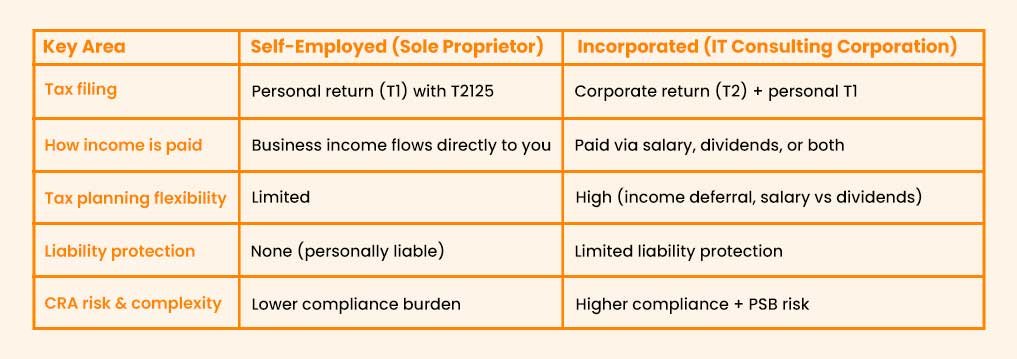
2. Should IT Contractors Incorporate in Canada?
Most contractors start out as sole proprietors. It’s easy, and you don’t have to pay to set anything up. But once you’re earning somewhere north of $60k-$80k, it’s time to crunch the numbers and see if incorporating makes sense.
3. What is a Personal Services Business (PSB) for IT Contractors?
PSB (Personal Services Business) is the scariest acronym in Canadian IT tax law.
If the CRA decides your corporation is a PSB, here is what happens:
- You lose the Small Business Deduction (SBD) (your tax rate jumps from around 12% to 38–44%.).
- You lose the ability to deduct almost all expenses (no home office, no travel, no equipment).
- You get slapped with an extra 5% federal tax penalty.
How to Avoid Being Classified as a PSB
- “5 Employee” Rule: If your corporation employs 5 or more full-time arm’s-length employees throughout the year, you are automatically not a PSB.
- Multiple Clients: Even small side gigs help. Having 3 clients paying you $20k each looks much better than 1 client paying you $60k.
- Invoice for Deliverables: Don’t invoice for “40 hours of consulting.” Invoice for “Completion of Phase 1 API Integration.”
- Own Your Space: Work from your home office, not the client’s HQ.
Unsure if your current contract setup puts you at risk for a PSB audit? Book a 15-minute strategy call to audit your status.
4. What Business Expenses IT Contractors can Deduct?
This is where IT contractors have an advantage over general contractors. Your tools are pricey, but they’re legit business write-offs. Here’s how to keep things clean with the CRA.
1. Hardware & Laptops
- Under $500: Fully deductible in the year of purchase. (e.g., a new mouse, keyboard, webcam).
- Over $500: You’ll need to depreciate it over time.
- Class 50 (55% CCA): Applies to computers, tablets and smartphones. (e.g., Your $3,000 MacBook Pro).
- Class 50.1 (100% CCA): Zero-emission vehicles, if you buy an electric car for your company.
- Peripherals: (monitors, docks, headphones, fancy chairs): Usually Class 8 (20% CCA).
2. Software & SaaS Subscriptions
This is the big one. If you use it for work, you can probably write it off.
- 100% Deductible: Adobe Creative Cloud, Microsoft 365, Slack Business, Jira/Asana, AWS/Azure bills, GitHub Copilot, hosting fees (GoDaddy, DigitalOcean), and API fees.
- Just be honest: If it’s partly personal (like a family Spotify subscription), only deduct the business share.
3. Home Office Deductions
Lots of IT contractors work from home, so this matters.
- The Formula: (Workspace Sq Ft / Total Home Sq Ft) x Eligible Expenses.
- Eligible Expenses: Rent (if you rent) or Mortgage Interest (if you own), Utilities (Hydro/Water), Internet, and Home Insurance.
- Warning: You cannot create a “capital gain” on the home office. If you claim a home office, that specific room is technically business property and you might have to pay tax on it when you sell the house. Usually, the tax is small, but be aware.
5. How Do IT Contractors File Taxes in Canada?
For Sole Proprietors (T1 Return)
1. Form T2125 (Statement of Business or Professional Activities)
This is the big one.
- You report Gross Revenue (Total invoiced).
- You report Expenses (Hardware, software, home office, meals).
- You calculate Net Income (Revenue – Expenses).
- This Net Income is added to your personal income and taxed at your marginal rate.
2. CPP Contributions (Self-Employed)
You pay both the employee and employer portions (approx. 11.9% total for 2026). It hurts now, but it builds your pension for retirement.
- Maximum 2026 Contribution: ~$8,460 on earnings up to $74,600.
3. CRA Deadlines You Cannot Miss
- Filing Deadline: June 15 (Self-employed get an extension).
- Payment Deadline: April 30.
- If you owe money and pay after April 30, the CRA charges interest daily, even if you file by June 15.
For Incorporated IT Contractors (T2 Filing)
1. T2 Corporation Income Tax Return
You need to file your T2 return within six months after your fiscal year ends.
- Most IT corps use a Dec 31 year-end.
- Deadline: June 30.
2. GST/HST Registrations & Returns
Once your revenue goes over $30,000 across four quarters, you have to register for GST/HST.
- After that, you can claim Input Tax Credits (ITCs).
- Example: Let’s say you bill a client $1,000 plus $130 HST, totalling $1,130. If you pay $50 HST on a server bill, you only send $80 to the CRA. The tax just flows through your business, so you’re not stuck paying the full amount out of pocket.
6. Should IT Contractors Choose Salary or Dividends?
This is the #1 question we get from our IT contractor clients: “Should I pay myself a salary or dividends?”
There’s no one-size-fits-all answer, honestly. It really comes down to what you want for retirement and how you manage your cash flow.
1. Salary
- Pros:
- Generates RRSP Contribution Room (Crucial for high earners).
- Creates a Tax Deduction for the corporation (reduces corporate tax).
- Counts towards CPP (Pension).
- Cons: You pay CPP premiums (expensive) and Income Tax (high rate).
2. Dividends
- Pros:
- No CPP premiums (Immediate cash savings).
- Generally taxed at a lower rate than salary at the same income level.
- Cons:
- No RRSP room generated.
- No EI (you can’t collect employment insurance).
- “Refundable Tax on Hand” issues in the corporation.
Final Thought
You didn’t become an IT contractor to become a tax expert, but ignoring the tax side of your business is like refusing to use a compiler because you prefer writing assembly code by hand. It’s slow, risky and in the end, it just eats into your profits.
Handle your taxes the smart way now, and you’ll hang onto more of what you earn, avoid the whole PSB headache, and actually get a good night’s sleep knowing you’re on the CRA’s good side.
FAQs
- Can I write off my gym membership?
Generally, no. The CRA considers it a personal expense. Unless you are a fitness instructor or your job has a physical requirement, it is not deductible. - Do I need to charge GST/HST to clients outside Canada?
Usually, no. Services to non-residents are zero-rated (0% tax). But you must file a return to prove the income was foreign. - I just incorporated but did no work. Do I need to file a T2?
Yes. Even for Nil returns, you must file to keep your corporation in good standing. If you don’t, the CRA may dissolve your company. - Can I deduct the cost of learning a new language?
No, unless it is a requirement for your specific contract. Deductions are for maintaining or upgrading skills in your current profession, such as learning Python or Rust.