
Selling online in Canada is no longer “under the radar.” With the full rollout of CRA mandatory reporting rules, your sales on eBay, Etsy, Amazon, and even Facebook Marketplace are no longer invisible to the government. Whether you’re decluttering a closet or building a dropshipping empire, the Canada Revenue Agency now receives a direct digital report of your earnings.
Ignoring these online seller tax obligations can lead to heavy penalties. In this guide, we’ll break down the $30,000 GST/HST threshold, how to use the T2125 form and the secret to maximizing your e-commerce tax deductions so you keep more of what you earn.
How the CRA Tracks Online Sellers Through Digital Platforms
The biggest change for Canadian online sellers is the mandatory Digital Platform Reporting. Under Part XX of the Income Tax Act, platforms like eBay, Etsy, Amazon, Poshmark, Airbnb and Amazon must report detailed seller information to the CRA.
What is being reported to the CRA?
If you complete 30 or more transactions or earn over $2,800 CAD in a calendar year, your platform will share:
- Your legal name and Social Insurance Number (SIN) or Business Number (BN).
- Total gross revenue (before fees or shipping).
- Number of transactions and payment processing details.
The CRA now has a “T-slip” for your online sales. If what you report on your taxes doesn’t match what the platform reported, it triggers an automatic audit flag.
CRA Hobby vs Business Rules for Online Sellers
The most fundamental question every online seller must answer is whether their activity constitutes a hobby or a business in the eyes of the CRA. This distinction determines whether you need to pay income tax on your sales, register for GST/HST and maintain detailed business records. The CRA uses “Badges of Trade” to decide if you owe money:
- Hobby Selling (Tax-Free): You are decluttering your home. You sell a used couch or old clothes for less than you originally paid. There is no intent to make a profit.
- Business Activity (Taxable): You buy items specifically to resell (flipping), you make handmade goods, or you use “business-like” methods (advertising, consistent shipping, maintaining inventory).
If you have a “profit-seeking motive” even if you haven’t made a profit yet, the CRA considers you a business. The new digital platform reporting makes it nearly impossible to argue otherwise when the CRA can see your transaction volume and frequency.
How to File Taxes for Online Sales in Canada
As a self-employed online seller, the CRA requires you to report every dollar of business income, regardless of the amount. To do this, you must complete Form T2125 (Statement of Business or Professional Activities) and include it with your personal T1 tax return. This form allows you to report both your business income and deductible expenses, ensuring compliance while accurately reflecting your earnings
- Report Gross Revenue: You must enter the total amount paid by the customer. This includes the item price, shipping charged, and any taxes you collected. Do not deduct platform fees yet.
- Deduct Platform Fees: This is where you lower your tax bill. List your eBay/Etsy fees, shipping costs, and payment processing fees (Stripe/PayPal) as separate line items.
- Schedule 88: If you are incorporated and filing a T2 return, you must also file Schedule 88 (Internet Business Activities) to list the URLs of the platforms (Amazon, Shopify, etc.) where you generate income.
Tax Preparation Checklist for Online Sellers:
When preparing your tax return, the CRA requires online sellers to provide detailed records. Make sure you include:
- Total gross revenue from all platforms
- Business expenses (detailed breakdown)
- Cost of goods sold calculations
- Business-use-of-home expenses (if applicable)
- Vehicle expenses (if used for business)
- Professional fees and software costs
Next Step: Download your eBay, Etsy, or Amazon sales reports monthly. Platforms often purge old data after a few years, but the CRA expects you to keep records for six years.
Selling on Multiple Platforms?
If you sell across eBay, Etsy, Amazon, and Shopify, the CRA views you as one single business entity.
- Consolidated Reporting: You combine the income from all platforms into one T2125 report.
- Separate Documentation: Even though the numbers are combined on your return, you must maintain separate digital folders for each platform’s reports. In the event of a CRA review, they will ask for a reconciliation showing how your “total income” was calculated from each source.
Platform-Specific Considerations:
- eBay: Track both auction and Buy It Now sales
- Etsy: Include both product sales and digital downloads
- Amazon: Separate FBA fees from product sales
- Kijiji: Document cash transactions carefully
When Online Sellers Must Register for GST/HST
A common myth is that you only need to worry about GST/HST if you make over $30k in a calendar year. This is incorrect. You must register for a GST/HST number if your total taxable revenue exceeds $30,000 over four consecutive calendar quarters.
How the $30,000 GST/HST Threshold Works:
- Calculation Period: Four consecutive calendar quarters (rolling 12-month period)
- Gross Revenue: Based on total sales before expenses
- All Sources: Includes income from all business activities, not just online sales
- Mandatory Registration: Must register within 30 days of exceeding threshold
Example: If you make $5k in Q3, $5k in Q4, $10k in Q1, and $11k in Q2, you have hit $31,000. You must register for a GST/HST number within 30 days of that final sale.
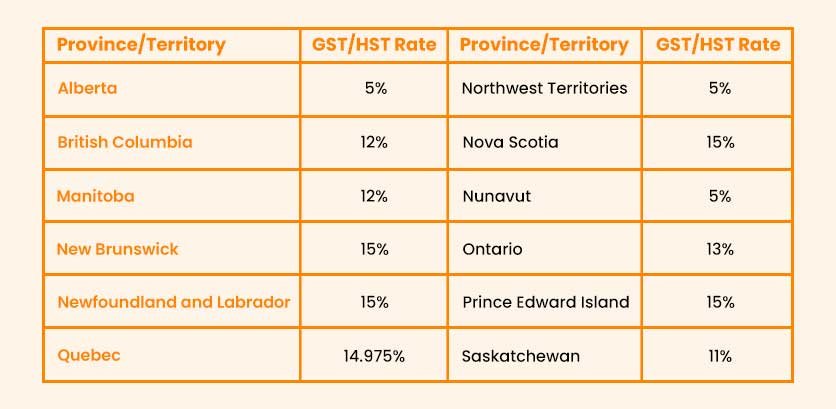
Provincial Variations in GST/HST Rates
In e-commerce, sales taxes are generally based on the destination of the goods or services. This means that businesses need to apply the correct GST, HST, or PST rates based on where the customer is located.
Selling to the USA and GST/HST Considerations
If you sell to customers in the USA, those sales count towards your $30,000 registration limit. However, once registered, you charge 0% GST/HST on exports. This allows you to register, remain competitive in the US market, and still claim Input Tax Credits (ITCs) to get back the tax you paid on your inventory and supplies.
CRA Approved Tax Deductions for Online Sellers
Understanding what business expenses you can deduct as an online seller in Canada is crucial for minimizing your tax burden and maximizing profitability.
1. Platform and Payment Processing Deductions
Fully Deductible Platform Fees:
- eBay final value fees and insertion fees
- Etsy transaction fees and payment processing fees
- Amazon referral fees and FBA storage fees
- PayPal, Stripe and Square processing charges
- Monthly subscription fees for selling tools
- Listing upgrade fees and promoted listing costs
Documentation Requirements:
- Download monthly statements from all platforms
- Reconcile platform fees with bank deposits
- Maintain records of fee calculations and policies
- Track promotional credits and fee adjustments
2. Inventory and Cost of Goods Sold Deductions
Cost of Goods Sold (COGS) Calculation: Opening Inventory + Purchases – Closing Inventory = Cost of Goods Sold
Deductible Inventory Costs:
- Purchase price of products for resale
- Shipping costs to receive inventory
- Import duties and customs fees
- Storage fees for inventory warehousing
- Packaging materials and supplies
Important Considerations:
- Personal use items don’t qualify for COGS treatment
- Must maintain accurate inventory counts
- Year-end inventory valuation affects taxable income
- Different valuation methods available (FIFO, weighted average)
3. Shipping and Packaging Deductions
Fully Deductible Shipping Expenses:
- Canada Post, UPS, FedEx, and courier fees
- Packaging materials (boxes, bubble wrap, tape)
- Shipping labels and printing supplies
- Postal scale and measuring equipment
- Insurance for shipped items
Mixed-Use Considerations:
- Separate business shipping from personal use
- Allocate vehicle expenses for post office trips
- Track time spent on shipping activities
- Maintain records of all shipping-related purchases
4. Home Office and Storage Space Deductions
If you use part of your home exclusively for your online selling business in Canada, you may be eligible for home office deductions.
Qualifying Home Office Requirements:
- Used exclusively for business purposes
- Used regularly and consistently
- Primary place of business or used for income-earning purposes
Deductible Home Office Expenses:
- Portion of rent or mortgage interest
- Home insurance (business portion)
- Property taxes (business portion)
- Utilities (heat, electricity, water)
- Home internet and phone (business portion)
- Maintenance and minor repairs
5. Vehicle Expenses for Online Sellers
Deductible Vehicle Uses:
- Trips to post office for shipping
- Sourcing inventory from suppliers
- Bank deposits and business errands
- Networking events and trade shows
- Storage unit visits for inventory
Calculation Methods:
- Track actual vehicle expenses and business percentage
Required Documentation:
- Detailed mileage log with dates, destinations and business purpose
- Gas receipts and maintenance records
- Insurance and registration documentation
- Vehicle purchase or lease agreements
6. Technology and Equipment Deductions
Fully Deductible Technology Expenses:
- Accounting software subscriptions (QuickBooks, Zoombooks Wave, etc.)
- E-commerce tools and apps
- Photography equipment for product photos
- Computer equipment used exclusively for business
- Printers, scanners and office equipment
- Internet hosting and domain registration
Capital vs Current Expense Considerations:
- Items under $500 can usually be fully expensed
- Expensive equipment may need to be depreciated over time
- Software subscriptions are typically current expenses
- Equipment with personal use requires allocation
7. Professional Services and Education Deductions
Deductible Professional Expenses:
- Accounting and bookkeeping fees
- Legal fees for business matters
- Business consulting and coaching
- Tax preparation fees for business returns
- Professional association memberships
Education and Training:
- Online courses related to your selling business
- Trade show attendance and networking events
- Books and publications for business improvement
- Software training and certification programs
Conclusion
Online selling in Canada isn’t just about making sales anymore, it’s about running a compliant business in a world where the CRA has full visibility into digital platforms. The rules have changed and ignoring them is no longer an option.
If you’re serious about growing your online business, clean bookkeeping and proper tax reporting are just as important as making sales. When you get it right from the start, you protect your business, avoid costly penalties and ensure you never miss a valuable deduction.
Disclaimer:
This guide provides comprehensive information about tax obligations for online sellers in Canada. Tax situations are highly individual and complex and laws change regularly. Always consult with qualified tax professional for advice specific to your circumstances and ensure compliance with current CRA requirements.

One Response